Machine Integration Classes: How To Assess the Connectivity Challenge of Your Machines
Some machines can be connected in an afternoon; others need the PLC program or extra hardware. Classify each machine before you start, and you know upfront how its data will be collected, how much effort it takes and what risks are involved. Whether you are a system integrator quoting a project or an end-customer planning a roadmap, this prevents surprises.
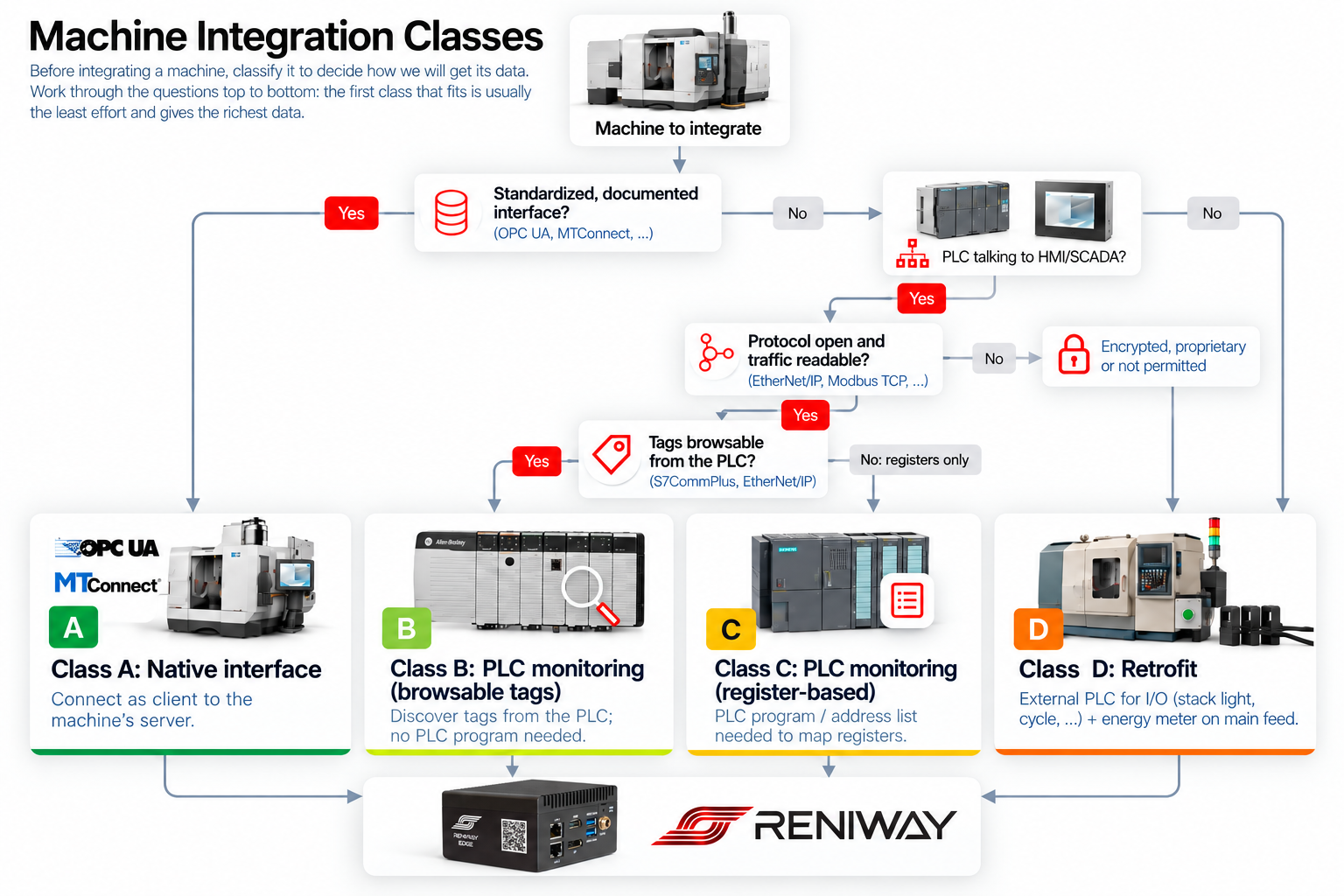
Four questions
Work through the questions top to bottom. The first class that fits is usually the least effort and gives the richest data.
-
Does the machine have a standardized, documented interface such as OPC UA or MTConnect? Yes → Class A. No → next question.
-
Is there a PLC talking to an HMI or SCADA system over the network? Yes → next question. No → Class D.
-
Is the protocol open and the traffic readable (EtherNet/IP, Modbus TCP, S7, ...)? Yes → next question. No, because it is encrypted (e.g. CIP Security), proprietary or monitoring is not permitted → Class D.
-
Can the tags be browsed from the PLC (S7CommPlus on S7-1200/1500, EtherNet/IP on Logix)? Yes → Class B. No, registers only → Class C.
The four classes
Class A: Native interface. The machine has a built-in OPC UA or MTConnect server and the edge device connects to it as a client. The interface is provided and approved by the machine builder, and in most cases the connection is secured with encryption and authentication. Since we use the machine exactly as the builder intended, there is no risk or liability issue. Data comes with its meaning attached, so this is also the fastest route to rich data. Check whether the interface is a licensed option on the controller, such as the HEIDENHAIN DNC option on a TNC 640.
Class B: PLC monitoring, browsable tags. The edge device reads the data the PLC exchanges with its HMI, for example by listening through a mirror port or network TAP. Because the PLC exposes symbolic tags, names and data types are discovered automatically: no PLC program needed.
Class C: PLC monitoring, register-based. Same approach as Class B, but the PLC only exposes raw registers or addresses (classic S7comm, Modbus, or PROFIBUS/MPI via an Ethernet gateway). You need the PLC program or an address list from the machine builder to know what each register means. See Getting the PLC program below.
Class D: Retrofit. There is nothing to tap into. An external PLC reads I/O signals such as the stack light, cycle and door signals, and an energy meter is added on the main feed. This gives machine state, cycle counts and energy consumption: often enough for OEE and energy monitoring. Liability is limited, because nothing in the machine's control is changed: we only sense. Always use galvanic isolation (for example optocouplers or isolated I/O) between the machine's signals and the external PLC, to avoid grounding issues and interference with the machine.
| Class | Effort | Data richness | Risk | What you need |
|---|---|---|---|---|
| A – Native interface | Low | High | None: builder-approved interface | Network access, interface option enabled |
| B – PLC, browsable tags | Low – medium | High | Low, with a careful polling strategy | Network access to the PLC traffic |
| C – PLC, register-based | Medium | Medium – high | Low, with a careful polling strategy | PLC traffic + PLC program or address list |
| D – Retrofit | Medium – high | Basic | Limited: sensing only | External I/O with galvanic isolation, energy meter |
Whatever the class, all data ends up in Reniway Edge, which maps it to one common data model for your MES, SCADA, dashboards or cloud platform.
Don't ask too much from the PLC
When data is read directly from a machine PLC (Class B and C), more is not always better. Reading too many tags at too high a polling rate adds communication load on the PLC, and on older or heavily loaded PLCs this can increase the cycle time of the machine itself. That is a production risk nobody wants.
That is why Reniver follows a recommended way of working to keep this risk to a minimum: read only the data that is actually needed, choose polling intervals that match how fast the data really changes, prefer passive listening where possible, and verify the machine's cycle time before and after the connection goes live.
Getting the PLC program from the machine builder
For Class C machines, the PLC program (or at least an address list) is needed to give meaning to the raw registers. Only the machine builder (OEM) can provide it.
Let us be very clear: the PLC program is only used to read and interpret data. It is never altered in any way, and the machine's PLC is never changed. The machine keeps running exactly as the builder designed it.
Machine builders are sometimes reluctant to share their PLC program. The strongest arguments are about risk management for the end-customer:
-
Continuity: if the machine builder can no longer support the machine (because of a bankruptcy, takeover or end of support), the end-customer can still keep the machine operational.
-
Cyber resilience: PLCs are an active target of cyberattacks. In 2026, CISA and the FBI warned that attackers had been modifying and deleting PLC project logic across US critical infrastructure, causing operational disruption and financial loss. With a copy of the original PLC program, the end-customer can quickly upload it again and get the machine running.
With good communication, Reniver has many times succeeded in obtaining the necessary PLC program while ruling out any liability or warranty issues for the machine builder. We can assist you in getting approval from the OEM, without hefty custom integration costs and without anyone having to alter the PLC code.
Applying it to your factory
Classify every machine and count how many fall in each class: that gives a realistic estimate of the total effort. Start with Class A and B for quick results, while collecting PLC documentation for Class C and planning hardware for Class D.
Two tips that move machines to an easier class:
-
Integrators: ask for PLC programs and address lists early, and check controller licences before quoting a machine as Class A.
-
End-customers: require OPC UA in the purchase specification of new machines, and keep PLC programs of existing machines in one safe place.
Let Reniver assess your machines
Not sure which class your machines belong to? Reniver will gladly come to your factory and make an estimation for your machinery. Our engineers look at your machines, controllers and network, classify each machine and give you a clear overview of the effort, the risks and the data you can expect.
Contact us to plan a site visit.